Part 02 ended with a 14-station table, but that table was the query side only — it only showed how the answer comes out. The four stations covering how documents enter the system, how metadata gets attached, and how the index gets built were never unfolded in Part 02.
This piece lays out the end-to-end capability map. From the moment a PDF enters the system to the moment an answer goes back to the user, the system may draw from 14 stations — but a single request usually activates only the subset its risk and intent require.
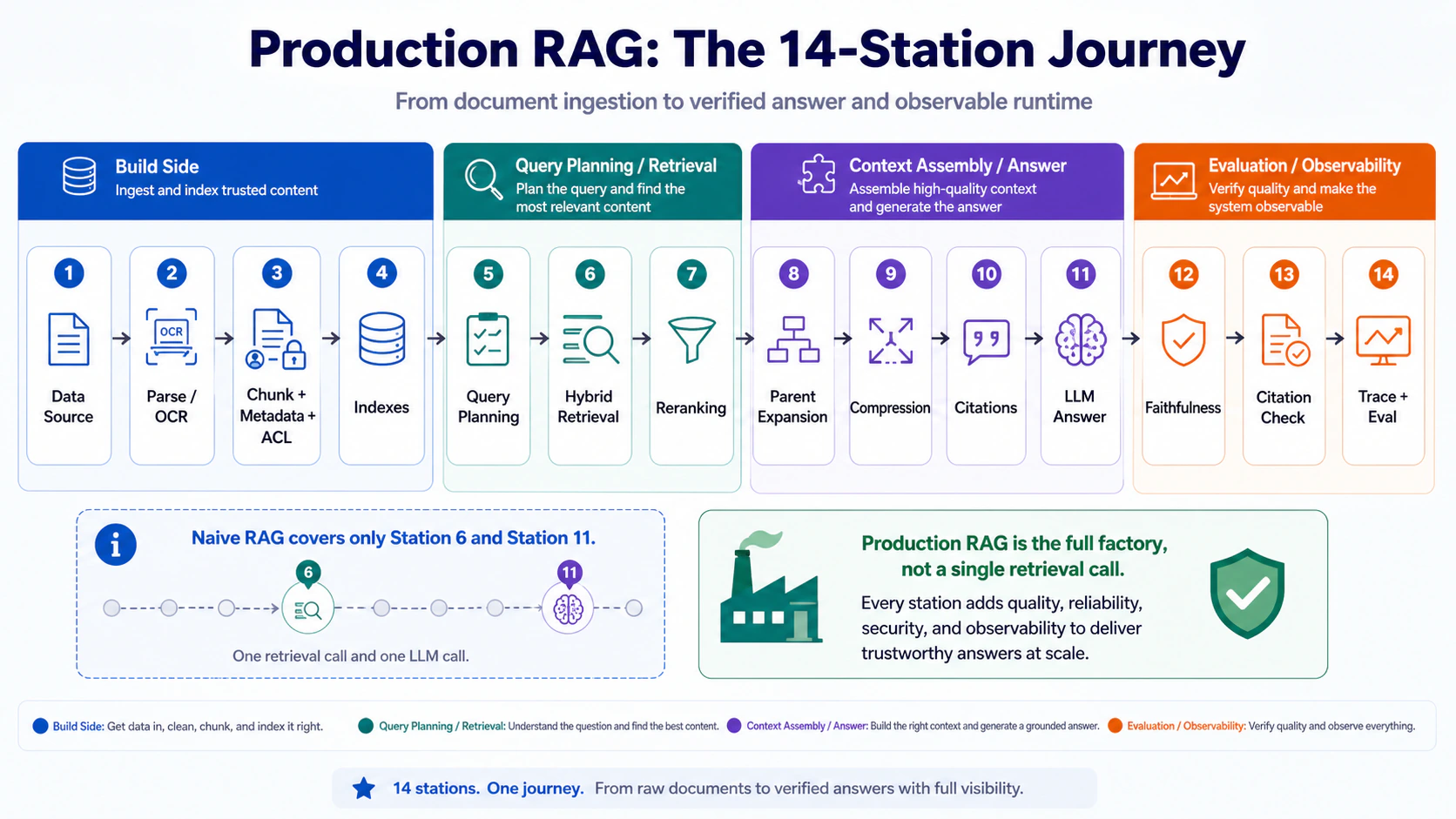
Build side (4 stations)
1.  Data source connector
2.  Parser / OCR
3.  Chunking + metadata + ACL
4.  Index (dense / sparse / metadata / docstore)

Query side (10 stations)
5.  Query planning (classification / rewrite / decomposition / routing)
6.  Hybrid retrieval (dense + BM25 + metadata filter)
7.  Reranking
8.  Parent-doc expansion
9.  Context compression
10. Citation assembly
11. LLM answer
12. Faithfulness check
13. Citation check
14. Tracing + eval
Naive RAG usually covers only stations 6 and 11. The other stations are capabilities that become more important as the system moves into higher-risk or higher-scale use cases.
The same map also tells you where specialized patterns belong, instead of treating them as standalone buzzwords.
| Specialized pattern | Where it attaches | Why it belongs there |
|---|---|---|
| Multimodal / Document RAG | Stations 2, 3, 10 | It extends parsing, metadata, and citation payloads, not just retrieval |
| Structured / SQL RAG | Stations 5, 6 | It is a routing pattern: some questions should hit SQL / APIs, not document paragraphs |
| Long-context Hybrid | Stations 8, 9, 10 | It retrieves first, then packs smarter; it does not stuff everything into context |
| Agentic RAG | Stations 5, 6, 12, 14 | It is a query-time workflow for planning, tool routing, evaluation, retry, and tracing |
Walked in order below as a map of capabilities, not as a rule that every query must execute every station.
Version note: this article uses pipeline diagrams and API-shaped examples to explain architecture. Package names, SDK calls, and managed-service defaults can change; pin versions in your own project and verify current docs before copying an implementation detail directly.
1. The build side: how documents come in
Station 1 — Data source
This is not an AI problem. It is a data-governance problem. Where the data lives, what format it is in, who is allowed to see it, how often it updates, which copy is the latest, whether there are duplicates — get any of these wrong and no amount of cleverness in the next 13 stations will save you.
The most common trap is dumping the entire Google Drive folder into the RAG. Two governance gaps — duplicate documents and out-of-date versions — can easily turn into weeks of cleanup. The first step at the data source layer is to define a connector, not to write code. Google Drive, PDF, Notion, Slack, DB — each source has its own update cadence and permission model. They need to be wired up separately, not mixed in one go.
Station 2 — Parser / OCR
Turn the document into clean structured content.
A lot of PDFs look like text, but in reality they are a chaotic mix of layers, tables, headers, footers and two-column layouts. A basic parser often produces broken structure: the table becomes a single line, the section order scrambles, and footnotes stick to the body. The LLM then receives unreliable input and produces unreliable answers.
In practice, split the work by document type. For plain text (Markdown / Google Docs), a basic parser is enough. For contracts, reports and slide decks, use a layout-aware parser such as LlamaParse, Unstructured or Docling. For scanned documents, invoices and financial reports, route to Mistral OCR, Azure Document Intelligence or AWS Textract. Do not slice tables as if they were ordinary text — keep them as a Markdown table or JSON, or the downstream LLM’s citations will fall out of place.
This is also where Multimodal / Document RAG enters. Documents are not only text. Production documents often contain tables, images, layout, captions and page coordinates. The hard part is not just whether a model can see an image; it is how non-text content gets preserved as something retrievable, citable and permission-aware. Part 09 will go deeper on this inside ingestion and document APIs. For now, mark the location: it mainly attaches to stations 2, 3 and 10.
Station 3 — Chunking + metadata + ACL
A naive chunk is just text. A production chunk carries three extra things on top: metadata, ACL, and a parent-child structure.
Metadata is the chunk’s identity card: document title, page number, section, heading path, date, language, doc_type, tenant_id, source_url. Without metadata, the moment a user asks “in the cooperation agreement signed in 2024 Q3, how does early termination work”, dense embedding alone will not get close — you need filters to narrow it down.
ACL is access control. An enterprise RAG cannot let everyone see everything. Every chunk carries access_roles and tenant_id, and the filter is applied at the retrieval layer. An RAG system without ACL is a data-leakage risk, even if the retrieval quality looks strong.
The parent-child structure is paving the way for station 8: small chunks are easy to search, large parents are easy to answer from. Every chunk has to carry a parent_id, so the query stage can walk back from a small chunk to the full section.
Station 4 — Index
Naive RAG often has only a dense vector index. A production-oriented design usually needs three index types side by side:
- Dense vector — handles semantic search, synonyms and fuzzy concepts. Weakness: it does not hold up on exact strings such as
GET /users/me/profile,INV-2025-003or contract clause numbers. - Sparse / BM25 — the upgraded form of classic keyword search. Specialised in proper nouns, API endpoints, names, IDs, numbers and clause numbers. What dense cannot find, this can.
- Metadata / payload index — for filters. Conditions like
document_type = legalandaccess_roles contains "admin", if not indexed, force a full scan on every query — slow and unsafe.
Build the three indexes together, query them together, and you have a production index layer. Both Qdrant and Azure AI Search support dense + sparse + payload filter as hybrid queries, then merge the results with RRF (Reciprocal Rank Fusion).
2. Query planning and retrieval: how the query comes in
Station 5 — Query planning
The user drops in a single line: “How does early termination work in this Q3 contract? What’s the penalty? And can you put it into a version I can send back to Legal?”
That is not one question. It is three. Query planning is the system thinking clearly first: what kind of question is this, which sources do we need to query, do we need to split it, do we need to rewrite it, which retriever do we route it to.
In implementation, that breaks into four jobs: Classification (judge the question type), Rewrite (turn natural language into something the search engine can chew on), Decomposition (split complex questions into subquestions), Routing (decide where to go). The four can be done by a single LLM emitting a structured plan in one go, or split into a multi-step workflow. LangGraph, LlamaIndex Workflow, CrewAI and AutoGen can all do it, but do not start with agentic — for a newcomer, a simple router node in LlamaIndex RouterQueryEngine or LangGraph is plenty.
Structured / SQL RAG enters at this station too. When a user asks, “what was churn rate by plan last month” or “list customers with ARR above 100k and a support escalation in the last 30 days”, the answer is not in document paragraphs. It is in tables, SQL, BI layers or internal APIs. That query should route to a SQL / API tool, not be forced through vector retrieval. Part 08 is where that routing decision becomes the main topic.
Station 6 — Hybrid retrieval
This is the step that actually “goes and finds the data”.
dense vector search top 50
+ BM25 / sparse search top 50
+ metadata / ACL filter
→ RRF merge
Why not just dense? Different questions need different retrieval signals. A semantic question like “how does early termination work” plays to dense’s strengths; an exact-string question like GET /users/me/profile or SKU-9921 plays to BM25’s. In production, it is not either/or — they run together.
The ACL filter runs at this step. Do not tell the LLM in the prompt “do not look at document A”. Permissions should be enforced by the retrieval layer, not by asking a text generation model to remember the boundary at answer time.
Station 7 — Reranking
Hybrid search pulls 50–200 candidates, and some of them only look relevant. The reranker uses a cross-encoder to reorder them, pushing the genuinely useful 5–20 to the top.
Mainstream options: Cohere Rerank (managed, ready in minutes), BGE reranker (self-hosted, cost under control), Jina / Voyage (multilingual or retrieval-heavy scenarios). Qdrant also has ColBERT / multivector options, but those are advanced — for a newcomer, an external reranker is the simpler path.
3. Context assembly and answer: turning candidates into LLM-ready context
Station 8 — Parent-doc expansion
A small chunk lets you find the location, but to answer you need the whole section.
The search pulls a single line: “no platform fee shall be charged”. Hand just that line to the LLM, and it has no idea what came before, so it might answer “no fee, and free forever” — that is the kind of hallucinated answer you get. Parent-doc expansion walks back from that line and pulls in the entire Section 3 — 3.1, 3.2, 3.3, the lot — and feeds that to the LLM. The lookup runs off parent_id in Postgres or the docstore.
Station 9 — Context compression
Once the whole section is back, half of it may have nothing to do with the question. Compression filters out the unrelated sentences and keeps only the parts that are actually relevant to the query. It saves tokens, cuts noise, and reduces the chance of the LLM citing the wrong thing. LangChain’s ContextualCompressionRetriever or a self-written LLM compressor can both do the job.
Long-context Hybrid also lives here. It does not mean stuffing every document into the context window. It means retrieval first, then smarter packing of a small set of highly relevant parent documents through compression, ordering and budget guards. When top-k chunks are too fragmented but the whole corpus is too expensive to pack, this pattern starts to make sense. Part 06 is where the trade-off gets unpacked.
Station 10 — Citation assembly
Bind every answer back to its source, page and section. Without citation assembly, even when the LLM is right you cannot verify it, and when it is wrong you cannot tell why.
In implementation, every chunk in the context bundle carries source_id, page and section, and the LLM prompt demands “every important claim must carry a source”. LlamaIndex’s CitationQueryEngine or a self-written source mapper can both do it.
Station 11 — LLM answer
This is where the LLM finally writes the answer. But a production prompt is not just “answer based on the following content”. It looks more like:
You are an internal company knowledge assistant.
Only answer from the context provided.
If the context is insufficient, say so explicitly.
Every important claim must carry a source.
Do not use any information that does not appear in the context.
If sources contradict each other, point out the contradiction.
The rules in this system prompt decide whether the answer is “trustworthy”. Write them soft, and the whole system is just demo-grade.
4. The last stretch: where production and demo part ways
Station 12 — Faithfulness check
Check whether the answer is faithful to the source.
The context only says “early termination requires 30 days’ notice”, and the LLM answers “early termination does not require prior notice” — that is unfaithful. The “does not require prior notice” bit is not in the source. Faithfulness check = for every claim in the answer, is it supported by the source? RAGAS, DeepEval, LlamaIndex Evaluators or a self-written LLM judge can all do it.
Station 13 — Citation check
Check whether the citation actually supports the claim. Different from faithfulness: faithfulness is about whether the answer has a basis, citation is about whether the citation points to the right place.
The common error: the answer says A, but the cited source only supports B. This one is especially painful in production, because the LLM sounds completely confident while the citation is pointing somewhere it should not. In implementation, a self-written LLM judge at claim level is the usual route.
Station 14 — Tracing and eval
Without tracing, a wrong answer becomes difficult to diagnose.
Tracing records the full path of each query: classification, rewrite, retrieval top chunks, reranked top chunks, LLM input, faithfulness result. Langfuse is open source, LangSmith integrates deeper with LangChain — pick one.
Agentic RAG should not be understood as “the model runs a few more steps by itself”. In this 14-station map, it crosses stations 5, 6, 12 and 14: plan first, decide whether to retrieve or call a tool, evaluate after execution, retry or change strategy when evidence is insufficient, and trace every step. Without those stations, agentic is just a harder-to-debug query pipeline. Part 08 turns it into an explicit runtime loop.
Eval is running a regression against a test set before going live. A 50–100 question test set is enough to start; rerun it on every pipeline change. The four metrics to compare are at least: Retrieval Recall, Answer Correctness, Faithfulness, Permission Leakage. Skip eval, and improving the pipeline is just vibes.
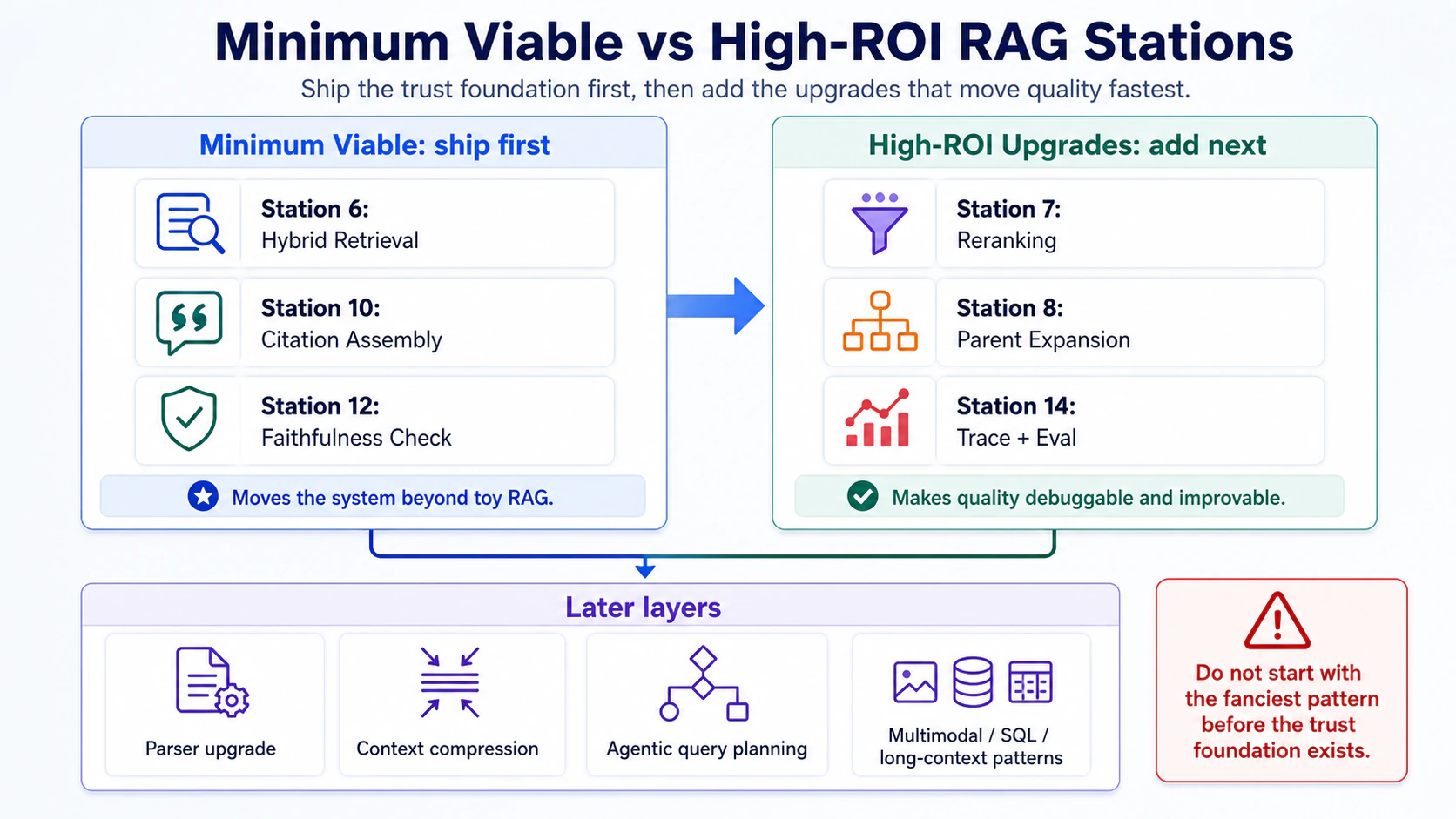
5. Minimum viable: the three capabilities I would ship first
If resources are tight, ship these three first for any system that answers from private or business-critical documents:
- Station 6 — Hybrid retrieval (dense + BM25 + metadata filter): without it, you are stuck on vector top-k, and off-topic and mis-cited answers will pile up.
- Station 10 — Citation assembly: without it, you cannot verify where the answer came from, which is a non-starter in the enterprise.
- Station 12 — Faithfulness check: without it, you have given the LLM free rein, and the answer may look right while having no basis in the source.
After these three, the system is still rough around the edges, but it has the minimum guardrails for higher-risk document QA. Low-risk FAQ can still take a smaller fast path; the point is to have the capability available when the query requires it.
6. The high-return upgrades worth adding later
Once you have resources, add these three:
- Station 7 — Reranking: coarse-to-fine, accuracy jumps noticeably. Cohere Rerank takes 30 minutes to wire up.
- Station 8 — Parent-doc expansion: cuts down on out-of-context quoting dramatically.
- Station 14 — Tracing and eval: gives you data to look at when you debug and optimise.
Add these three and the system becomes much easier to improve safely. The other stations (parser upgrade, context compression, agentic query planning) are risk-based additions rather than mandatory work for every request.
Production RAG is not a single line of execution and not every request runs the full map. The 14 stations are a capability inventory: each station solves a specific problem, and the router decides which subset a given query deserves. Naive RAG usually exposes only a small part of the map; the other stations are where reliability, governance, and debuggability enter when risk rises.
The interactive demo in Part 01 exposes this routing idea directly: you can query the RAG system, change mode, and watch which path the trace takes. Part 04 will break down how these capabilities map across LlamaIndex, LangGraph and n8n — which tool owns which line, and which scene calls for which one.