The story: Q3 contract retrieved, contents belong to a different company
One afternoon, the business team was testing the RAG system in a demo environment. They typed in “What’s the termination clause in our Q3 supplier contract” — RAG returned a passage, citation [1] pointed to a file, they opened it: the contract number was NatyNites-Q3-2024, not theirs.
Demo environment. No user separation. The RAG system appeared to run correctly: the answer looked reasonable and the citation was present, but the retrieved content belonged to another company. This bug doesn’t surface in the demo phase — the demo environment only has your own documents.
But in production, it can’t stay hidden. User A, user B, user C are all using the system at the same time, and the chunks in Qdrant aren’t separated by who owns them; the same day a user complained “the answer looks like it’s from another company,” and pulling up the log showed users from three different companies (nattynites, company-a, company-b) all hitting the same chunk batch. The fix required re-tagging every chunk’s tenant_id, re-running ingestion, and spending three days isolating the polluted chunks. This bug isn’t RAG written wrong — it’s the document-side metadata design never being treated as a production-grade concern. The demo environment only ever has your own documents, so nobody designs cross-tenant test cases upfront.
No matter how well Part 08 designed the four capabilities and the five query modes, query-side routing can’t fix what the document side never designed. This post, Part 09, walks through the seven stations a document actually travels after upload, why the Vector DB cannot be the source of truth, and why ACL in production is not a single filter.
Tested API-shape note: the snippets in this article show the implementation shape used by this project, not a permanent SDK contract. Pin your Python packages, keep a minimal smoke test for each snippet, and re-check LlamaIndex / Qdrant / FastAPI / evaluation-framework docs when upgrading.
The seven-station document-side journey (high level)
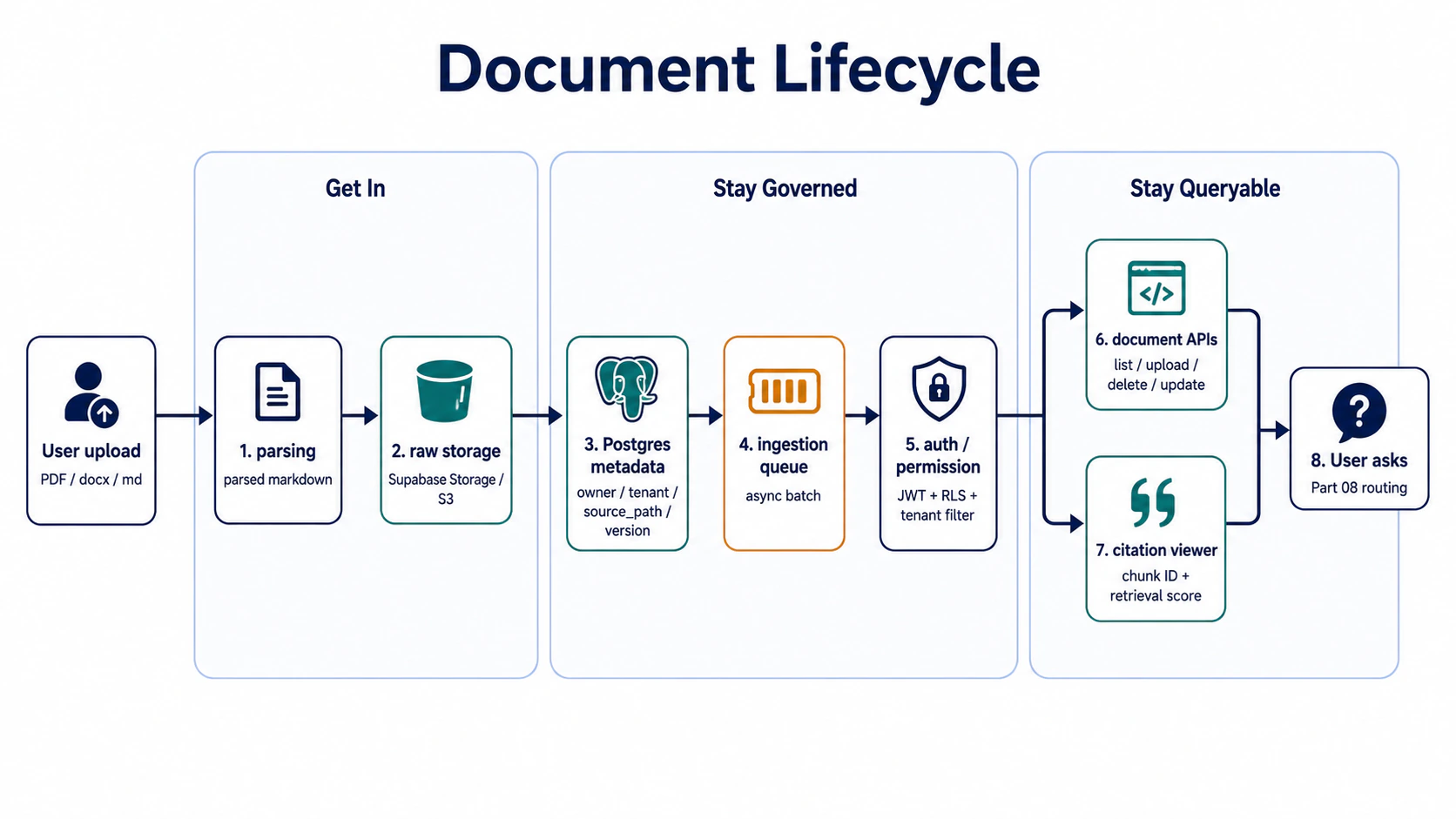
The seven stations split into three threads:
- Get in (stations 1–2): how a file on disk becomes something indexable
- Stay governed (stations 3–5): how metadata lives, who can see what, how not to leak
- Stay queryable (stations 6–7): management interface, answer explainability
Bottom line up front: the seven stations can be implemented separately, but the metadata design (station 3) and ACL (station 5) are the two most commonly underestimated, and when they break, you have to rebuild. The other five stations are relatively linear and don’t usually need large rewrites once they’re shipped.
Thread one: get in (parsing + raw storage)
Station 1: parsing — turning PDF / docx into parsed markdown
The first thing that happens when a file enters the system is parsing. PDF and docx are formats for humans to read, not for embedding models — what comes out of a PDF is a coordinate stream, docx is an XML structure, and chunking or embedding fed on these raw formats performs poorly.
A layer of parsed markdown is needed in between: convert PDF / docx into structured markdown (preserving headings, lists, tables, code blocks).
Takeaway: parsed markdown is a good intermediate format — it preserves structure (heading hierarchy, tables, code blocks), chunks well (cuts by heading or paragraph both make sense), and is re-processable (changing chunking strategy doesn’t require re-parsing).
Failure case: storing PDF binary into object storage, parsing at query time.
❌ PDF into object storage → parse at query time → chunking
✅ PDF into object storage → parse once into markdown → store markdown
Lazy parsing at query time looks like it saves space, but in practice every query re-does the parsing and latency spikes; changing chunking strategy also re-parses every file. At larger document counts, that becomes operationally expensive. Parsing should be a one-time ingestion job whose output is reused.
Failure scenario: in the early days, lazy parsing at query time was tried. Every query slowed by 800ms, changing chunking once took six hours. The decision was made to parse once at ingestion.
One more positioning note: Multimodal / Document RAG is not just “chat with images”
One term has to be clarified here because it becomes easy to confuse in 2026-style document RAG: Multimodal / Document RAG.
It does not simply mean “the chatbot can look at images.” In the context of Part 09, it means: when a document enters the system, do not extract only text; preserve table, image, and layout signals that affect answers and citations.
If a PDF is flattened into one long text stream, many enterprise documents break at ingestion:
| Content type | What ingestion should preserve | What retrieval / citation uses later |
|---|---|---|
| text | paragraph, heading, section path | normal chunk retrieval, parent expansion |
| table | table JSON, markdown table, row / column headers | amounts, clause comparison, specification lookup |
| image | image caption, figure pointer, alt text, OCR text | charts, flow diagrams, screenshot-heavy docs |
| layout | page, bbox, reading order, OCR confidence | citation viewer highlights, audit, low-confidence reprocessing |
I would still use parsed markdown as the main spine, but I would keep element-level metadata beside it. Conceptually:
{
  "document_id": "doc_123",
  "elements": [
    {
      "type": "table",
      "section_path": ["MSA", "Termination"],
      "page": 12,
      "bbox": [88, 140, 512, 430],
      "ocr_confidence": 0.97,
      "table_markdown": "| Term | Notice | Fee | ... |",
      "table_json": {
        "columns": ["Term", "Notice", "Fee"],
        "rows": [["Early termination", "30 days", "2 months"]]
      }
    },
    {
      "type": "image",
      "section_path": ["Architecture", "Network"],
      "page": 18,
      "bbox": [72, 96, 540, 620],
      "image_caption": "Cloudflare -> FastAPI -> Qdrant request path",
      "figure_pointer": "s3://bucket/doc_123/page_18_fig_02.png"
    }
  ]
}
Those fields are not there to make the database look complete. They support three later jobs:
- retrieval can choose the right representation: text uses text chunks, tables use table rows, figures use captions / OCR / figure pointers.
- the citation viewer can actually locate evidence: not just “page 12”, but a bbox or section path that can be highlighted.
- eval can identify parser failure: if OCR confidence is low or table headers disappear, that is an ingestion failure, not an LLM failure.
Takeaway: The first dividing line in Document RAG is not model strength. It is whether ingestion preserves document structure. If text / table / image / layout are flattened into the same plain-text stream during parsing, even strong retrieval can only guess later.
Station 2: raw storage — object storage and Postgres split the work
Both the parsed markdown and the original PDF have to be stored. But don’t dump everything into Postgres.
Object storage (Supabase Storage / S3 / GCS) and RDB split the work:
| Data | Where | Why |
|---|---|---|
| Original PDF / docx | Object storage | rarely read, large files, cost-sensitive |
| Parsed markdown | Object storage | re-read when chunking changes, doesn’t go in DB |
| Structured metadata | Postgres | has to be queryable, joinable, ACL-filtered |
| Embedding | Vector DB | dedicated to similarity search |
Takeaway: Postgres stores metadata, not content. Object storage stores content, not metadata. The Vector DB is a derivative of the metadata, not the source of truth (this point gets expanded in station 3).
Failure case: dumping markdown into Postgres BYTEA, metadata all in JSONB.
-- ❌ Failure case
CREATE TABLE documents (
  id UUID PRIMARY KEY,
  raw_content BYTEA,        -- markdown stuffed here
  metadata JSONB,           -- tenant_id, owner, version stuffed here too
  embedding vector(1536)
);
Why it’s wrong: metadata has to be queried / indexed / filtered (list all of a user’s documents, clear ACL), and JSONB queries are slow, indexing is painful; markdown has to be re-read (changing chunking strategy reads it all), and shipping whole text via BYTEA costs more than pulling it from object storage. Structured and unstructured have to be separated.
Thread two: stay governed (metadata + ingestion + auth)
Station 3: Postgres metadata = source of truth (the core claim)
This is the most commonly overlooked, most expensive-to-rebuild claim in Part 09.
The Vector DB (Qdrant / Pinecone / Weaviate) is designed for similarity search, not as a source of truth. So metadata has to land in Postgres first, and the Vector DB is the retrieval engine that Postgres derives.
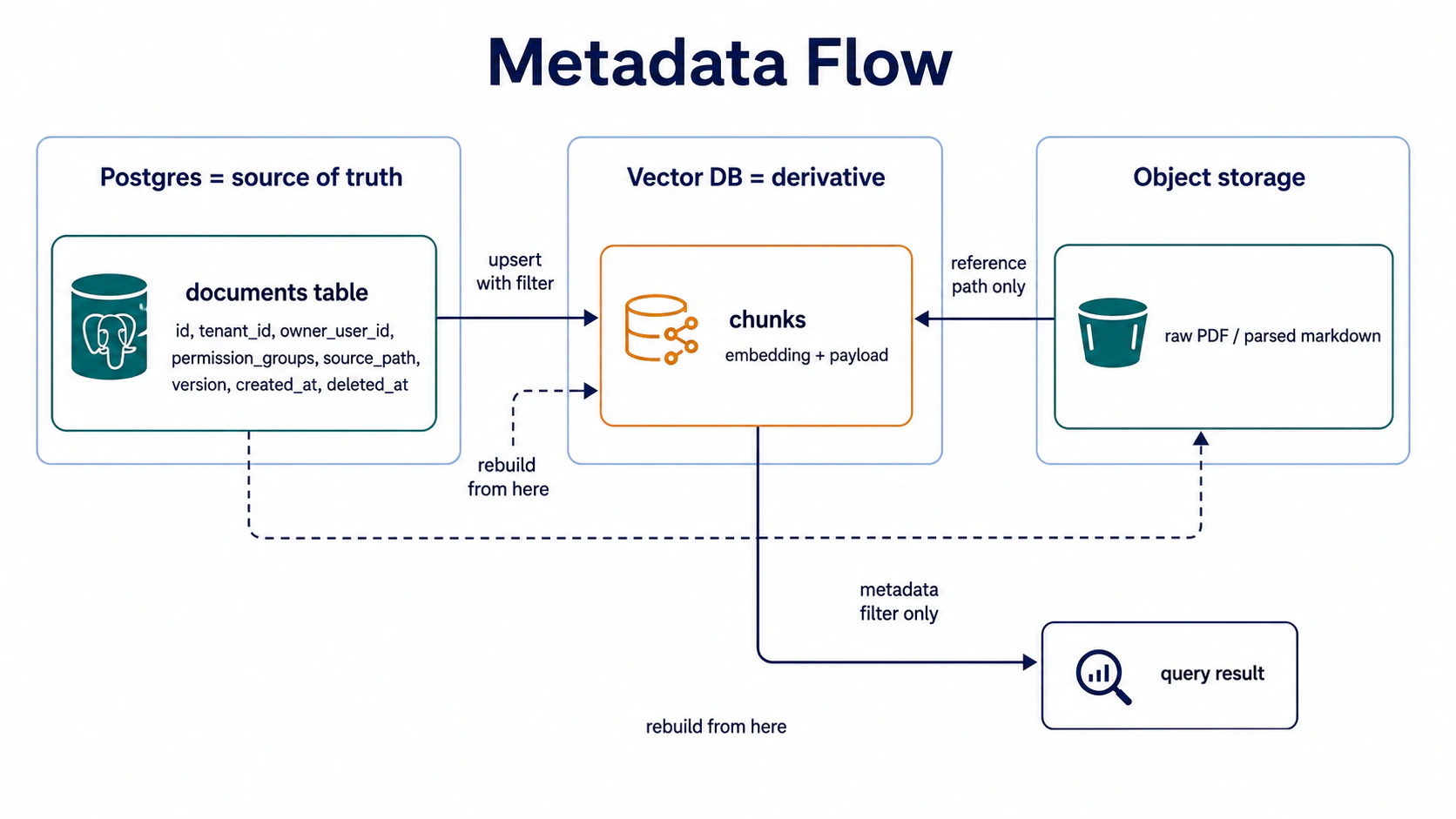
Metadata broken down:
CREATE TABLE documents (
  id UUID PRIMARY KEY,
  -- identity
  tenant_id TEXT NOT NULL,           -- which company / workspace
  owner_user_id TEXT NOT NULL,       -- who uploaded
  permission_groups TEXT[],          -- what roles in this tenant
  -- provenance
  source_path TEXT NOT NULL,         -- "contract" / "faq" / "runbook" / "open"
  -- version
  version INT DEFAULT 1,
  parent_document_id UUID,           -- lineage for re-uploads
  created_at TIMESTAMPTZ DEFAULT now(),
  deleted_at TIMESTAMPTZ,            -- soft delete, not hard
  -- ingestion state
  ingestion_status TEXT,             -- pending / processing / done / failed
  ingestion_job_id TEXT              -- matches ingestion queue
);Takeaway: Postgres is the source of truth, the Vector DB is a derivative, object storage is the content carrier. When deleting a file: mark
deleted_atin Postgres first, then delete Vector DB chunks, then delete object storage content — get the order wrong and you get orphans.
Failure case: stuffing tenant_id / owner_user_id into the Vector DB’s payload, Postgres only storing the file name.
# ❌ Failure case
qdrant.upsert(
    points=[
        PointStruct(
            id=chunk_id,
            vector=embedding,
            payload={
                "file_name": "Q3-contract.pdf",
                "tenant_id": "company-a",   # metadata in vector DB
            }
        )
    ]
)
Why it’s wrong: when deleting, Postgres has no tenant_id → can’t tell which chunks in Vector DB to delete; ACL queries (can user A see this file) have to go through Vector DB payload filter, 10x slower than a Postgres indexed column; when Qdrant has to rebuild, all the metadata has to be re-stuffed. Putting metadata in the wrong place is an early signal that a rebuild may be needed later.
Failure scenario: in the early days, all metadata was stuffed in Qdrant payload and Postgres only stored file names. Deleting one file meant going to Postgres to look up the file name, then to Qdrant to find all chunks with that file name in the payload, then deleting them one by one. Qdrant can’t filter by file name (no payload index), so it has to full-scan. Deleting 10,000 files took 40 minutes. The decision was made: Postgres is the source of truth, the Vector DB is a derivative, delete a file uses Postgres
idto query Qdrant directly forchunk_idsand batch-delete.
Station 4: ingestion queue — synchronous ingestion can’t hold up production
After an incoming file enters the system, it goes through parsing → store → metadata → index. This pipeline should not be triggered synchronously in the API request.
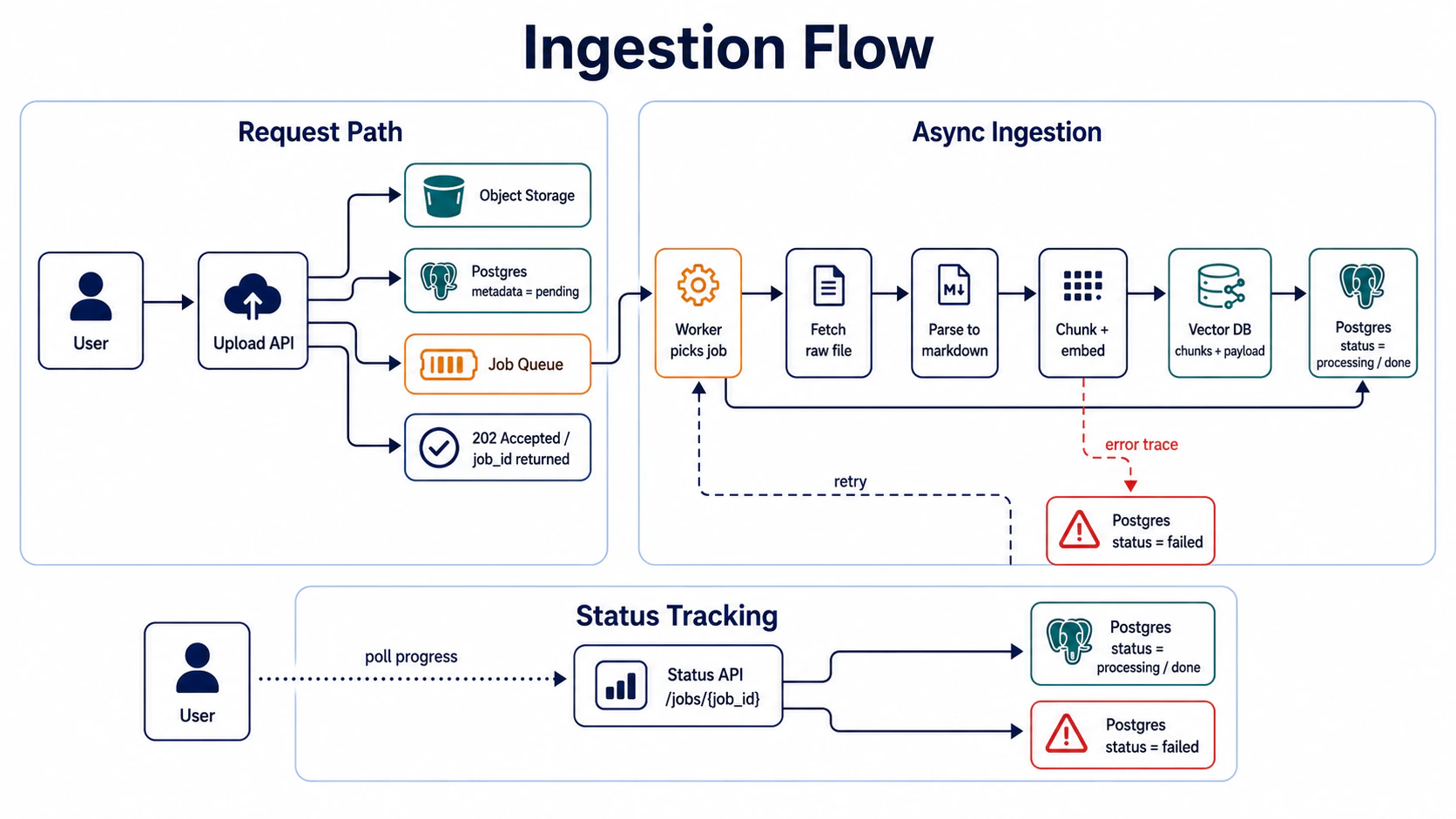
Takeaway: the upload API only accepts the file + enqueues the job, it doesn’t run ingestion. Workers run asynchronously, status writes back to Postgres, the user polls progress via
job_id.
Failure case: API request synchronously triggers the entire ingestion (parse + chunk + embed + upsert).
# ❌ Failure case
@app.post("/upload")
async def upload(file: UploadFile):
    markdown = await parse(file)           # 5s
    chunks = await chunk(markdown)          # 2s
    embeddings = await embed(chunks)         # 10s (external API)
    await upsert_to_vector_db(embeddings)    # 3s
    return {"status": "done"}                # 20s total
Why it’s wrong: 20 seconds synchronous → user-side timeout, upload fails but the file is already written to storage and orphaned, no retry if the worker crashes. Production ingestion must be async, must have retries, must have status trace.
Failure scenario: in the early days of launch, synchronous ingestion was used. One day 500 users uploaded at the same time → every API timed out, files stuck in storage without entering the DB, users complained “I uploaded but I can’t find it.” The job queue pattern was adopted: 202 Accepted +
job_idpoll for progress, retries, status trace, all three backfilled. The next six months processed 120,000 files, p99 ingestion latency held at 8 minutes (500 parallel workers). Synchronous ingestion breaks in production for a reason that’s worse than speed — timeouts, orphan files, and user complaints all hit at once.
Station 5: auth + permission — ACL defense in depth (four failure scenarios)
Part 08’s query-side routing decides which mode a query takes, the document-side ACL decides which documents this user can pull. The two sides are independent; together they make up the full access control.
ACL design in production commonly fails in four places, ordered by when the breakage surfaces: header spoofing → no tenant filter → app-layer filter with no RLS → JWT without membership check. Each one causes cross-tenant data leaks — the trigger is just different. The four sub-sections below break each one down.
Three terms first: user_id, tenant_id, permission_groups
Before getting into the four failure scenarios, three commonly conflated fields:
user_id            = who this person is (identity, from JWT sub claim)
tenant_id          = which org / workspace they're operating in (company, team, project)
permission_groups  = what role they hold in that tenant (admin / staff / viewer / finance / etc.)
A user can belong to multiple tenants; a tenant can have multiple permission_groups. For example, Daniel in the nattynites tenant is a hotel_admin:
{
  "user_id": "daniel",
  "tenant_id": "nattynites",
  "permission_groups": ["default", "hotel_admin"]
}
The core questions behind the four ACL defense layers all revolve around these three fields: who gets the user_id (authentication), whether they can enter the tenant (authorisation), what they can do inside it (role). The four failure scenarios below are different breakpoints for those three questions.
Failure 1: header spoofing (a common dev-stage ACL failure)
# ❌ Failure case: dev stage uses headers to fake identity
curl -X POST https://api.example.com/ask \
  -H "X-User-Id: alice" \
  -H "X-Tenant-Id: company-a" \
  -d '{"query": "Q3 合約"}'
# ❌ Failure case: FastAPI trusts headers directly
@app.post("/ask")
async def ask(req: Request, body: AskBody):
user_id = req.headers.get("X-User-Id") # anyone can change this
tenant_id = req.headers.get("X-Tenant-Id") # anyone can change this
return await rag.ask(body.query, user_id, tenant_id)Why it’s wrong: headers are client-controlled; an attacker changes X-User-Id: ceo and impersonates the CEO. Dev-stage headers are fine for simulating identity, but production must use real token verification (Supabase Auth JWT, Auth0, Clerk, etc.), user_id parsed from the token, never read from headers.
Fix: swap header mode for JWT mode.
# ✅ Production: Authorization Bearer token
curl -X POST https://api.example.com/ask \
  -H "Authorization: Bearer eyJhbGciOiJIUzI1NiIs..." \
  -d '{"query": "Q3 合約"}'
# ✅ user_id from JWT sub, not from header
@app.post("/ask")
async def ask(req: Request, body: AskBody, auth: AuthContext = Depends(verify_jwt)):
user_id = auth.user_id # from token.sub, unforgeable
tenant_id = auth.tenant_id # from membership table
return await rag.ask(body.query, user_id, tenant_id)Failure 2: no tenant filter (retriever pulls the whole library)
After JWT verifies identity, the retriever must add tenant filter when pulling chunks, otherwise it still leaks.
# ❌ Failure case: Qdrant query has no tenant filter
def retrieve(query: str, user_id: str, tenant_id: str):
    embedding = embed(query)
    results = qdrant.search(embedding, top_k=10)  # no filter, pulls everything
    return results
User A in company-a tenant asks "Q3 contract termination clause"
→ Qdrant searches the whole library, pulls 10 closest chunks
→ 2 of them are company-b's contracts
→ LLM returns company-b's clauses to User AFix: every Qdrant query carries a tenant filter. The Qdrant 1.x Python client builds query_filter from models.Filter + models.FieldCondition + models.MatchValue:
Qdrant API drift note: older examples often show
client.search(...). Newer Qdrant Python-client examples may usequery_points(...)and slightly different request objects. Keep the invariant — every retrieval call must carry the tenant filter — and adapt the method name / request wrapper to the Qdrant client version you pin.
# ✅ Mandatory tenant filter (Qdrant 1.x python client)
from qdrant_client.http import models

def retrieve(query: str, user_id: str, tenant_id: str):
    embedding = embed(query)
    results = qdrant.search(
        embedding,
        top_k=10,
        query_filter=models.Filter(
            must=[
                models.FieldCondition(
                    key="tenant_id",
                    match=models.MatchValue(value=tenant_id),  # mandatory filter
                ),
            ]
        ),
    )
    return results
But app-layer filter alone is not enough (see failure 3).
Failure 3: app-layer filter with no Postgres RLS (one code bug and it’s broken)
# ❌ Failure case: filter only at the app layer
@app.get("/documents")
async def list_documents(req: Request):
    user_id = req.headers.get("X-User-Id")
    tenant_id = req.headers.get("X-Tenant-Id")
    # forgot to write tenant_id filter ← this one bug, full library leaked
    return await db.query("SELECT * FROM documents")
Why it’s wrong: app-layer filter relies on engineers remembering to write it every time; forget one and the full library leaks. Add Postgres RLS (Row Level Security) as defense in depth, but do it carefully: the tenant context must come from verified identity and membership, not from a client-controlled header, and it must be scoped to one transaction so pooled database connections cannot leak a previous tenant into the next request.
-- ✅ Postgres RLS: enforced filter at the DB layer
ALTER TABLE documents ENABLE ROW LEVEL SECURITY;
ALTER TABLE documents FORCE ROW LEVEL SECURITY;

CREATE POLICY tenant_isolation ON documents
  USING (
    tenant_id = current_setting('app.tenant_id', true)
    AND EXISTS (
      SELECT 1
      FROM tenant_memberships tm
      WHERE tm.user_id = current_setting('app.user_id', true)
        AND tm.tenant_id = documents.tenant_id
    )
  );
# ✅ Tenant context comes from JWT + membership and is transaction-local.
@app.get("/documents")
async def list_documents(
req: Request,
auth: AuthContext = Depends(verify_jwt),
):
requested_tenant = req.query_params.get("tenant_id")
membership = await db.fetchrow(
"""
SELECT tenant_id
FROM tenant_memberships
WHERE user_id = $1 AND tenant_id = $2
""",
auth.user_id,
requested_tenant,
)
if not membership:
raise HTTPException(403, "No tenant access")
async with db.transaction():
# set_config(..., true) is LOCAL to this transaction.
# It avoids SQL injection and prevents tenant leakage across pooled connections.
await db.execute("SELECT set_config('app.user_id', $1::text, true)", auth.user_id)
await db.execute("SELECT set_config('app.tenant_id', $1::text, true)", membership["tenant_id"])
# even if the WHERE tenant_id = ... is forgotten here, RLS still blocks
return await db.fetch("SELECT * FROM documents")Two operational details matter:
- Use a restricted application role for normal traffic. Table owners and roles with
BYPASSRLScan bypass policies;FORCE ROW LEVEL SECURITYkeeps the table owner honest, but superusers andBYPASSRLSroles still need to stay out of the request path. - Add a cross-tenant integration test: user A in
company-acan list onlycompany-adocuments; the same JWT withtenant_id=company-breturns 403; a reused pooled connection after the request cannot see either tenant without setting a fresh transaction-local context.
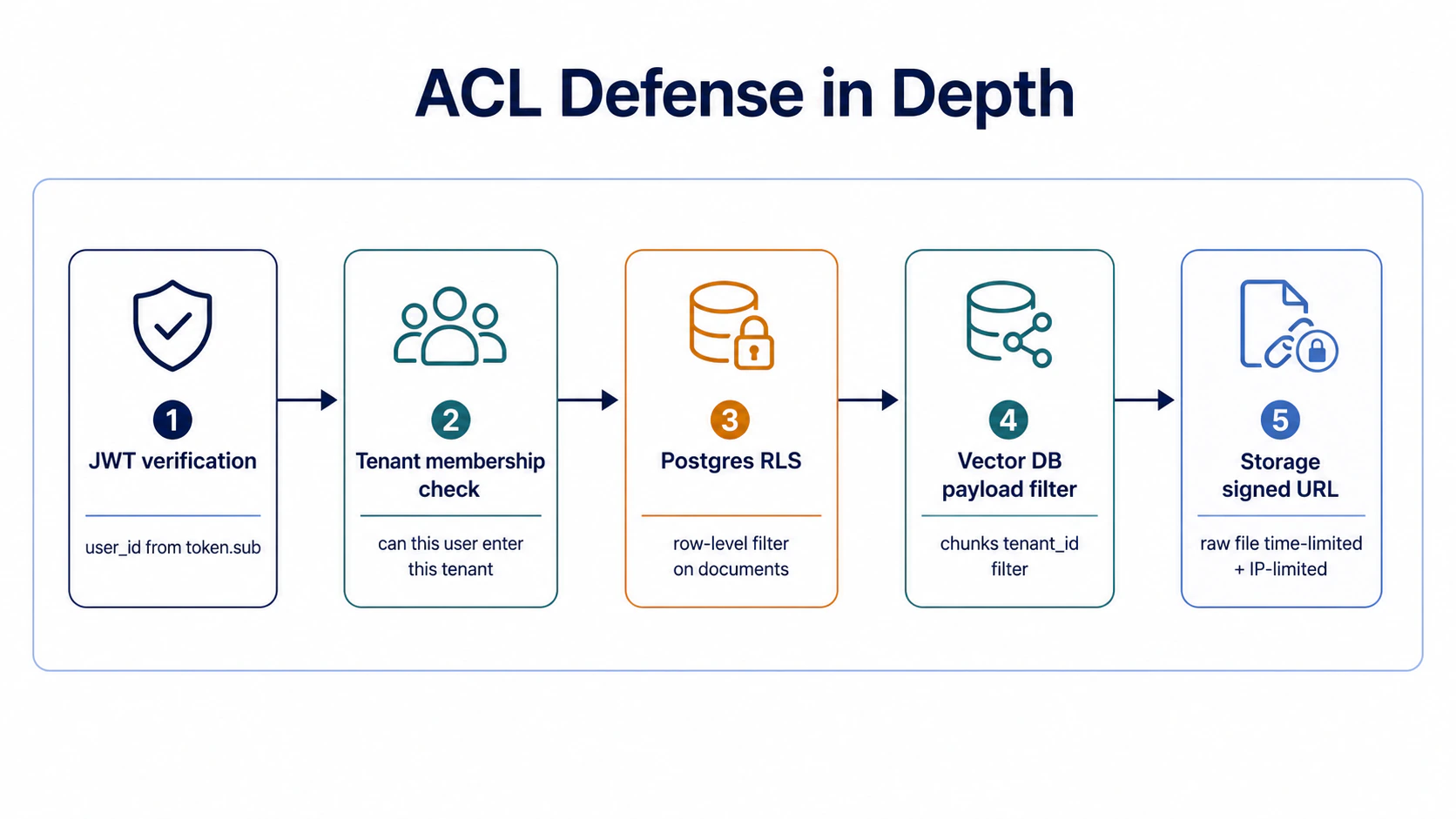
Takeaway: ACL isn’t done in one layer. Postgres RLS + Vector DB payload filter + Storage signed URL + App-layer filter — each of the four layers blocks a different scenario. If any one layer fails, the other three still hold — that’s the real meaning of defense in depth.
Failure 4: JWT without membership check (having a token doesn’t mean you can enter a tenant)
# ❌ Failure case: trusts JWT alone
@app.post("/ask")
async def ask(req: Request, body: AskBody, auth: AuthContext = Depends(verify_jwt)):
    tenant_id = req.headers.get("X-Tenant-Id")  # tenant from header
    return await rag.ask(body.query, auth.user_id, tenant_id)
Why it’s wrong: JWT can only prove “who this person is” (sub: alice), it cannot prove “whether alice can enter company-b tenant.” An attacker with a legitimate token can change the header to switch the tenant to someone else’s, and still pull their data.
Fix: JWT proves identity, the membership table proves authorisation, tenant comes from membership, not from header.
-- ✅ Membership table
CREATE TABLE tenant_memberships (
  user_id TEXT NOT NULL,
  tenant_id TEXT NOT NULL,
  permission_groups TEXT[],
  PRIMARY KEY (user_id, tenant_id)
);
# ✅ tenant from membership
@app.post("/ask")
async def ask(req: Request, body: AskBody, auth: AuthContext = Depends(verify_jwt)):
membership = await db.query(
"SELECT tenant_id, permission_groups FROM tenant_memberships WHERE user_id = $1",
auth.user_id,
)
if not membership:
raise HTTPException(403, "No tenant access")
tenant_id = membership["tenant_id"] # from DB, not from header
return await rag.ask(body.query, auth.user_id, tenant_id)Takeaway: JWT and membership are two different things. JWT proves identity (who you are), membership proves authorisation (where you can enter). Production ACL has to have both layers.
Thread three: stay queryable (document APIs + citation viewer)
Station 6: document APIs — the management interface
User uploads a file, lists files, deletes a file, updates metadata — none of these operations should hit the DB directly.
# ✅ Document APIs
@app.get("/documents")
async def list_documents(auth: AuthContext = Depends(verify_jwt)):
    """list the files the user can see (ACL applied automatically)"""

@app.post("/documents/upload-url")
async def get_upload_url(req: UploadRequest, auth: AuthContext = Depends(verify_jwt)):
    """get a signed upload URL (time-limited + path-limited)"""

@app.delete("/documents/{doc_id}")
async def delete_document(doc_id: str, auth: AuthContext = Depends(verify_jwt)):
    """delete a file (Postgres soft delete → Vector DB delete chunks → Storage delete file)"""

@app.patch("/documents/{doc_id}/metadata")
async def update_metadata(doc_id: str, req: MetadataUpdate, auth: AuthContext = Depends(verify_jwt)):
"""update metadata (permission_groups / source_path / etc.)"""Takeaway: document APIs are the only interface between the user and the system — all ACL is enforced at the API layer, all audit logs are written at the API layer. Management UI hits DB directly = ACL bypass, no audit log.
Document APIs have one more easy-to-miss responsibility: they should not only return document lists; they should expose the document’s verifiable structural state. If Part 09 preserved page / bbox / section path / OCR confidence earlier, the management API should make that state visible.
{
  "document_id": "doc_123",
  "title": "Q3 supplier contract.pdf",
  "ingestion_status": "done",
  "modalities": ["text", "table", "image", "layout"],
  "element_counts": {
    "text": 84,
    "table": 6,
    "image": 3
  },
  "quality_flags": {
    "low_ocr_confidence_pages": [7, 18],
    "tables_without_headers": 1
  }
}
That contract gives three groups a shared view of system state: users know whether the document is queryable, admins know which document needs parsing re-run, and developers know whether a bad answer should be debugged from ingestion or retrieval first.
Failure case: writing an admin script that hits DB directly to “manage things quickly.”
# ❌ Failure case: admin cleans up test data quickly
async def cleanup_test_documents():
    await db.execute("DELETE FROM documents WHERE source_path = 'test'")
    # bypasses ACL, no audit log, can't trace who deleted later
Failure scenario: an admin used psql to delete test files directly, then a user complained “my files are gone,” the audit log had no record, and it took two days to recover from backup. All write operations go through the API — that’s not just ACL, it’s auditability.
The Part 01 demo’s backend management is wired through document APIs — the “upload / list / delete” buttons the user sees are backed by the same API set.
Station 7: citation viewer — the last mile of explainability
Every answer carries [1] [2] citations, click through to see the source text + chunk ID + retrieval score. Part 06 covered retrieval enhancement (hybrid + rerank + parent expansion), Part 07 covered citation check (faithfulness holds up against the source), this station covers how citations get delivered to the viewer.
How the payload flows from retrieve to viewer — each retrieval stage contributes one field to the citation payload:
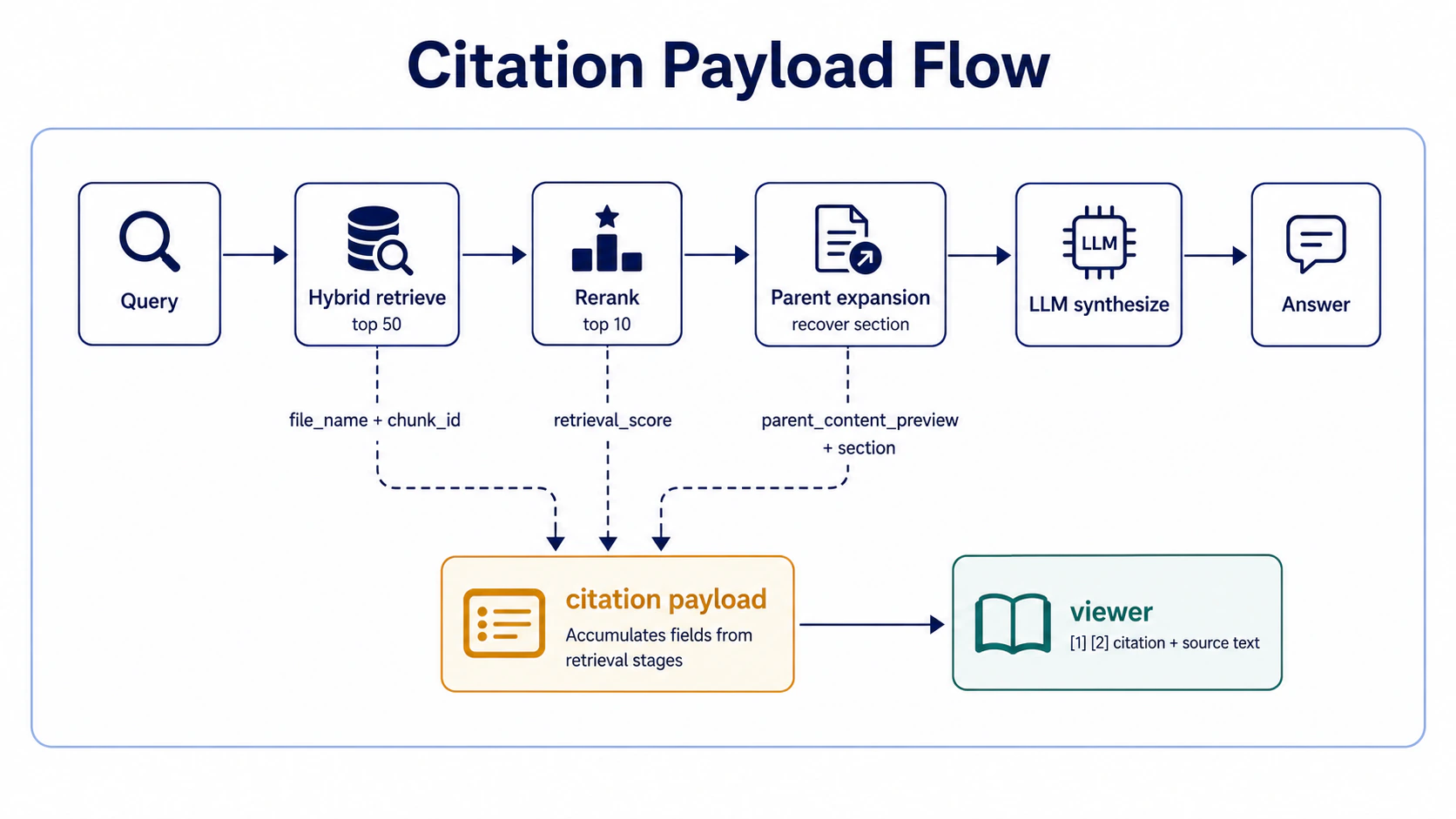
Payload example (not pseudo code — the actual JSON shape sent to the viewer):
{
  "answer": "Q3 終止條款規定提前 60 天書面通知。",
  "citations": [
    {
      "id": 1,
      "file_name": "NatyNites-Q3-2024.pdf",
      "chunk_id": "doc_abc_chunk_42",
      "parent_doc_id": "doc_abc",
      "section": "Article 5. Termination",
      "retrieval_score": 0.92,
      "parent_content_preview": "Article 5. Termination\nEither party may terminate this Agreement upon sixty (60) days prior written notice...",
      "highlights": [
        {"start": 0, "end": 87, "match": "Either party may terminate..."}
      ]
    }
  ]
}Takeaway: a citation is not just “file name + line number” — it has to have
chunk_id(for debugging),retrieval_score(so you know whether it was vector recall or keyword),parent_content_preview(so the user can verify without downloading the file),highlights(so the user can see at a glance which passage was cited).
Failure case: citation only gives “file name + line number”.
// ❌ Failure case
{
  "answer": "Q3 終止條款規定提前 60 天書面通知。",
  "citations": [
    {"file_name": "NatyNites-Q3-2024.pdf", "line": 42}
  ]
}
Why it’s wrong: the user sees “line 42” and has to dig through the PDF to find the 42nd line; when debugging, you don’t know whether this chunk was pulled by vector recall (score 0.92) or keyword (score 0.4), so you can’t tell which part of retrieval went wrong; auditors verifying the answer’s truth have no source text and can only trust the LLM. Bad citation design pushes explainability onto the LLM and the user instead of the system.
Failure scenario: in the early days, citation only had file name + line number, and when users complained “the AI is making things up,” we had to dig through PDFs to find the source for each case — 20 minutes per debug. After
chunk_idandretrieval_scorewere added to the payload, debug took 30 seconds — query Qdrant payload directly and you know which station went wrong.
Part 09 + Part 08 = the full production RAG closure
The document side (Part 09’s seven stations) and the query side (Part 08’s five modes) together make up the full closure of production RAG:
File enters system → Part 09 stations 1–5 (parsing → storage → metadata → queue → ACL)
User asks         → Part 08 5-mode routing
                  → Part 09 station 5 ACL filters which docs the user can see
                  → Part 08: each mode runs its own pipeline
                  → Part 09 station 7 citation viewer
                  → answer + [1] [2] citations back to the user
The two sides are independent, and either one can fail the system: the document side isn’t designed (Part 09) → cross-tenant leak, deleting a file can’t even find the chunks; the query side isn’t designed (Part 08) → every query runs the same set. Both sides done well is exactly what the Part 01 interactive demo runs.
Part 10 then takes apart “the 3 months and 11 pitfalls of pushing this closure into production” — what each of these 7 stations breaks during deployment, which ACL layer fails first, how the citation viewer gets monitored, how the ingestion queue scales.