這份 Appendix 不是 Part 12。
主線已經在 Part 11 收束了。這一篇的任務比較像工具索引:當你真的要把 RAG 做進 production,會一路遇到哪些工程步驟?每一步在解什麼問題?常見工具有哪些?我會先選哪個?什麼情況代表你該換工具?
所以這不是「最強 RAG 工具排行榜」。工具名會變,API 會變,定價會變,社群熱度也會變。比較穩定的是工程問題本身:
- 文件怎麼進來?
- 權限與 metadata 怎麼保住?
- retrieval miss 是 recall 問題、precision 問題,還是 context fragmentation 問題?
- 回答怎麼驗證?
- 系統壞掉時怎麼 debug?
- 成本與 latency 是哪一層爆掉?
如果前面 11 篇是從 naive RAG 一路走到 production backbone,這份 Appendix 就是那條路的查表版。
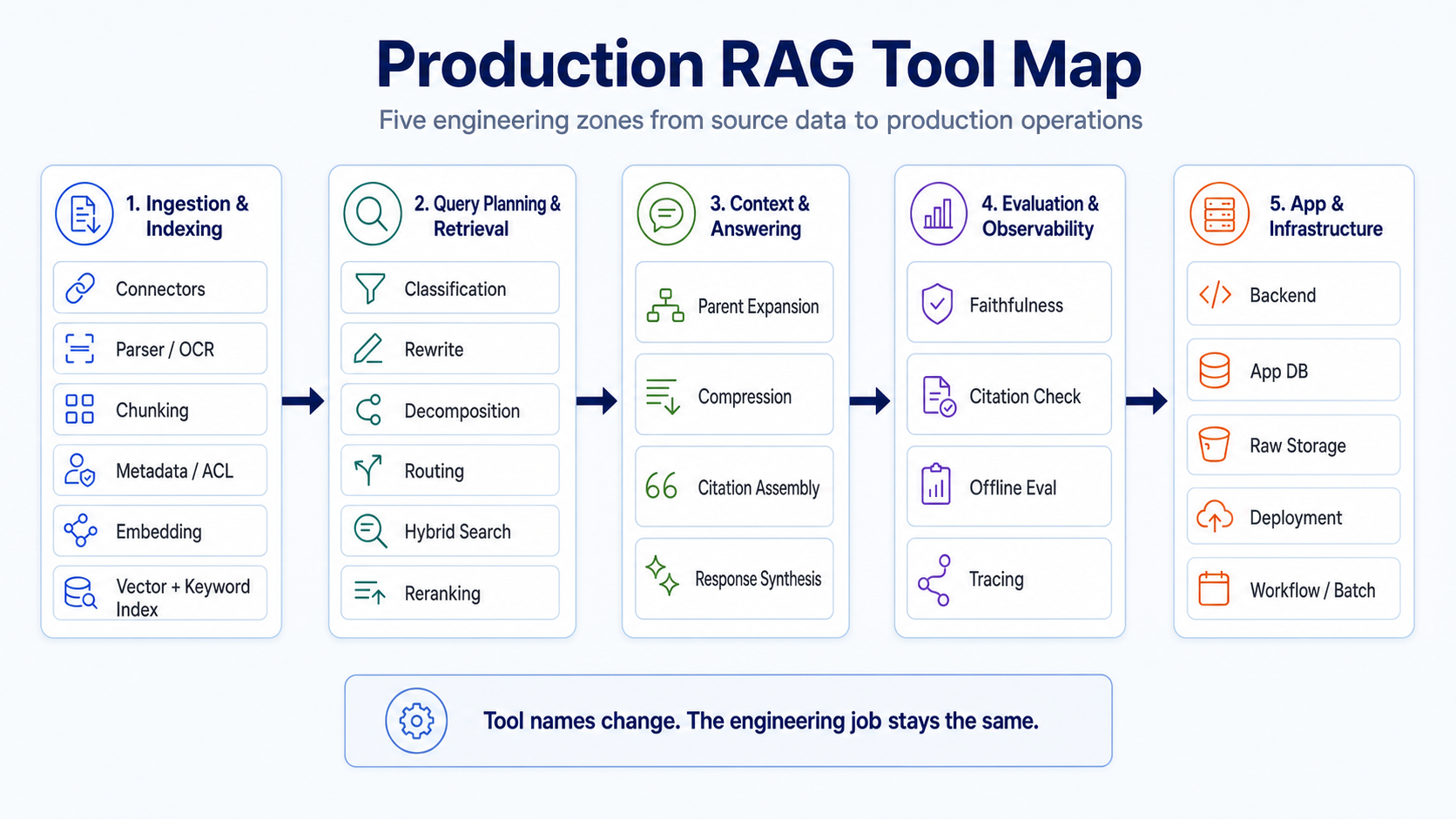
使用方式:先看工程步驟,再看工具名
工具表版本化提醒:這份 Appendix 是 capability index,不是 lockfile。凡是版本敏感工具,例如 LlamaIndex、LangChain、Qdrant、RAGAS、DeepEval、Langfuse、OpenAI models、Cloudflare、Docker、託管 vector DB,都應該在專案內維護一份 compatibility note:tested package/service version、current API shape、deprecated method names、migration link,以及證明該列仍可用的 smoke test。
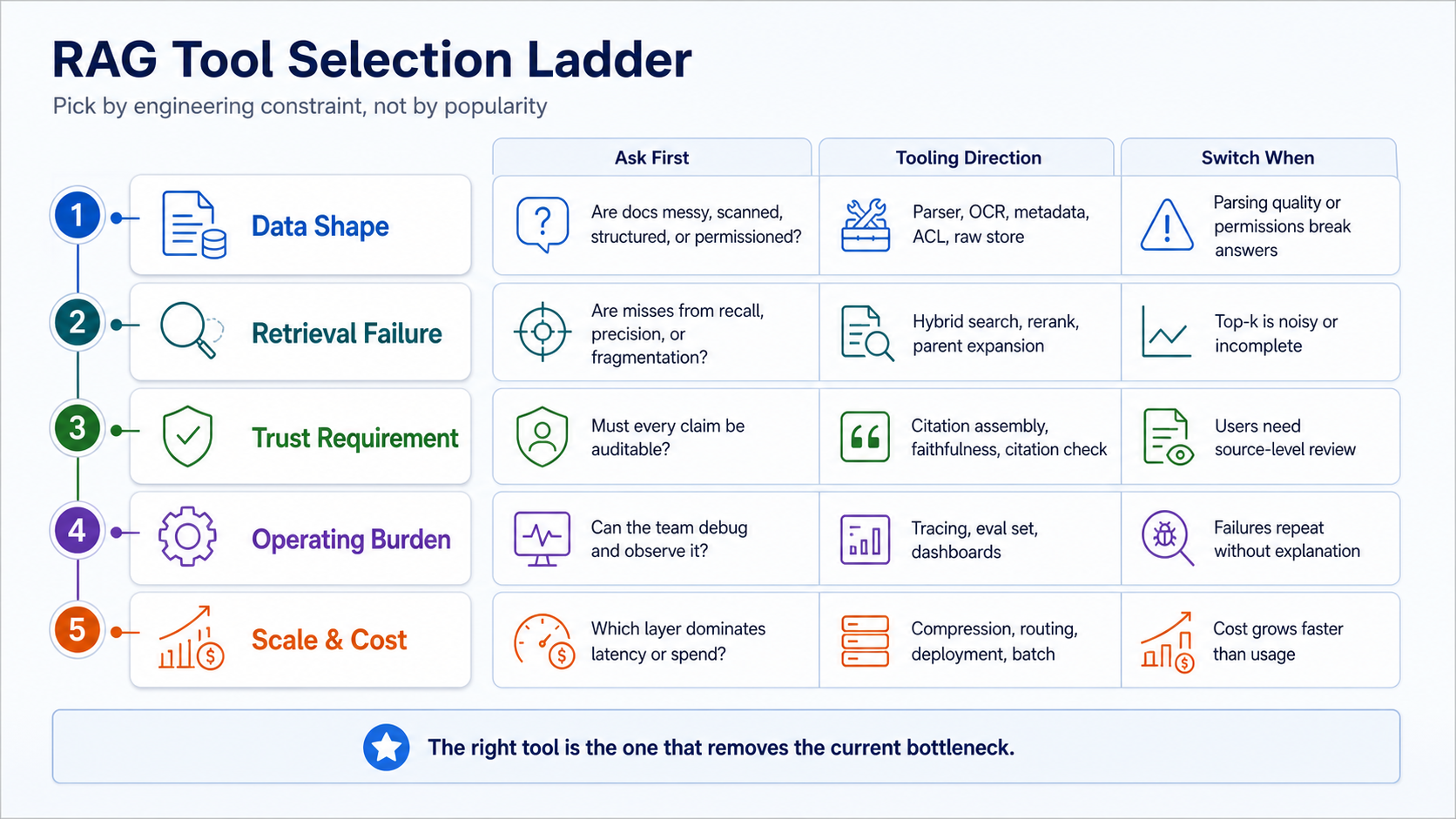
讀這份表時,我建議每一列都用同一個順序問:
- 這一步到底在解什麼問題?
- 主流工具有哪些?
- 如果我今天要先做,我會先選哪個?
- 什麼情況代表這個選型要換?
- 有什麼常見坑?
這個順序很重要。很多 RAG 專案選型會卡住,不是因為工具不夠多,而是還沒講清楚自己卡在哪一層。
A. 資料接入與建庫
這一區是 build side。它決定你的知識庫乾不乾淨、可不可以更新、權限會不會外洩、後面 retrieval 有沒有足夠訊號可以用。
| Step | 解什麼問題 | 主流工具 | 我會先選 | 什麼情況要換 | 常見坑 |
|---|---|---|---|---|---|
| Data source connectors | 把資料從 Google Drive、Notion、Slack、GitHub、S3、DB、網站拉進系統 | LlamaIndex Readers、LangChain document loaders、Airbyte、custom ETL | 少量來源先用 LlamaIndex Readers 或 custom connector | 來源多、同步規則複雜、需要 CDC 時換 Airbyte 或專用 pipeline | 只拉內容不拉 source id、updated_at、owner,後面無法增量更新 |
| Parser / OCR / document conversion | 把 PDF、Office、HTML、掃描圖轉成可用文字與結構 | Unstructured、LlamaParse、Docling、Azure AI Document Intelligence、Google Document AI、Tesseract | 技術文件與 PDF 先試 LlamaParse 或 Docling;掃描文件看雲端 OCR | 表格、版面、頁碼、章節層級解析不穩時要換 | 只拿純文字,丟掉頁碼、標題層級、表格語意 |
| Chunking / node creation | 把文件切成可檢索單位 | LlamaIndex NodeParser、LangChain text splitters、semantic chunking、custom splitter | 先用 markdown header / sentence-aware chunking,再保留 parent id | 問題常需要跨段落或跨 section 才能回答時要改 parent-child chunking | chunk 太小會碎,chunk 太大會混雜 |
| Metadata extraction | 建立 source、title、section、page、time、entity、doc type 等 retrieval 訊號 | LlamaIndex extractors、LLM-based extraction、spaCy、custom rules | 先用 deterministic metadata,再補 LLM extraction | metadata 需要分類、實體、日期推斷時再加 LLM | metadata 寫得漂亮但不可 filter,等於沒用 |
| ACL / permission | 避免使用者查到不該看的文件 | source ACL sync、app DB permission table、row-level security、metadata filters | 先把 user/group/tenant 寫進 metadata 與 app DB | 權限繼承複雜、跨系統群組同步時要獨立權限服務 | 只在 UI 擋權限,retrieval 層沒有 filter |
| Raw docstore / parent store | 保存原文、父文件、section path,支援 citation 與 parent expansion | Postgres、S3/R2、MongoDB、LlamaIndex docstore | 原文放 object storage,metadata 與 parent mapping 放 Postgres | 文件版本多、審計要求高時加 versioned store | 只存 chunk 不存原文,後面無法重切、重建、引用 |
| Dense embedding | 把文字轉成語意向量 | OpenAI embeddings、Cohere Embed、Voyage AI、bge、e5、Jina embeddings | 英文和多語先用雲端 embedding;成本敏感再自架 | domain vocabulary 命中差、語言效果差、成本過高時要換 | 沒固定 embedding model 版本,重建 index 後結果漂移 |
| Dense vector DB | 做近似向量搜尋 | Qdrant、Pinecone、Weaviate、Milvus、pgvector、Elasticsearch vector search | 小到中型先 pgvector 或 Qdrant;託管需求高看 Pinecone | 資料量、filter latency、HA、multi-tenant 隔離成瓶頸時換 | 只看 benchmark,不測自己的 filter 與 payload |
| Sparse / BM25 / keyword index | 抓 exact match、代號、錯字少的關鍵詞 | Elasticsearch、OpenSearch、Postgres full-text、Meilisearch、BM25 retriever | 先用 Postgres FTS 或 Elasticsearch/OpenSearch | 關鍵詞權重、同義詞、中文斷詞需要精調時換 | 以為 dense vector 可以取代 keyword search |
| Metadata filter index | 讓 source type、tenant、date、doc id 等 filter 變快 | DB index、Qdrant payload index、Elasticsearch filters、Postgres indexes | 先把高頻 filter 欄位建 index | filter 佔 query latency 大頭時要重設 schema | metadata 有寫但沒建索引,production 才發現慢 |
B. Query Planning 與 Retrieval
這一區是 query side。Naive RAG 通常只做 top-k vector search;production RAG 需要先判斷問題型態,再決定走哪條 retrieval path。
| Step | 解什麼問題 | 主流工具 | 我會先選 | 什麼情況要換 | 常見坑 |
|---|---|---|---|---|---|
| Query classification | 判斷 query 是 fact lookup、comparison、summary、troubleshooting、creative、agentic | small LLM classifier、rules、LlamaIndex router、custom intent classifier | 先用 rules + small LLM | mode 多、錯誤代價高時才訓練 classifier | 把 classification 做太細,debug 反而更難 |
| Query rewrite | 把口語問題改成更適合 retrieval 的查詢 | LlamaIndex query transform、LangChain query rewriting、custom prompt | 先做 conservative rewrite,保留原 query | 使用者常用簡稱、錯字、跨語言時加強 rewrite | rewrite 過度,改掉使用者真正意圖 |
| Query decomposition | 把複合問題拆成多個子問題 | LlamaIndex sub-question query engine、LangChain decomposition、custom planner | 只有 comparison / multi-hop query 才開 | 子問題需要不同資料源或不同 retrieval mode 時使用 | 每個問題都 decomposition,latency 和成本暴增 |
| Routing | 決定 query 要走哪個 index、哪個 tool、哪個 mode | LlamaIndex RouterQueryEngine、LangGraph、custom router | 先用少數固定 mode:fast、safe、deep_eval、creative、agentic | 資料源多、workflow 多、需要 tool calling 時升級 | router 沒 trace,答錯時不知道走哪條路 |
| Hybrid search | 結合 dense vector、BM25、metadata filter | Qdrant hybrid、Weaviate hybrid、Elasticsearch、LlamaIndex fusion retriever | 先做 dense + BM25 + metadata filter,再用 RRF 合併 | exact terms、代號、產品名常 miss 時必做 | 沒校準 dense 與 sparse 權重,結果互相污染 |
| Reranking | 對候選 chunks 重新排序,提高 precision | Cohere Rerank、bge-reranker、Jina reranker、Voyage rerank、cross-encoder | 先用託管 reranker 驗證品質,再考慮自架 | top-k 有資料但順序錯、噪音多時要加 | rerank 太多候選,latency 和成本爆掉 |
C. Context 與回答生成
這一區決定 LLM 看到的是碎片、噪音,還是可回答、可引用的 evidence pack。
| Step | 解什麼問題 | 主流工具 | 我會先選 | 什麼情況要換 | 常見坑 |
|---|---|---|---|---|---|
| Parent-doc expansion | top chunks 太碎時,拉回 parent section 或 parent document | LlamaIndex recursive retriever、parent-child mapping、custom docstore | 先做 section-level parent expansion | 答案需要上下文、流程、條款、前後段落時使用 | 只看 chunk 分數,忽略同一 parent 的連續訊號 |
| Context compression | 刪掉與 query 無關的內容,降低 token 與噪音 | LlamaIndex compressor、LangChain contextual compression、reranker-based filtering | 先用 reranker 或 sentence-level compression | parent expansion 後 context 太長時使用 | compression 刪掉 citation 所需的原文 |
| Citation assembly | 把 answer claims 綁回 source、page、section、chunk id | LlamaIndex citation query engine、custom citation mapper、source span mapping | 我會自訂 citation mapper,保留 source path | 合規、內部審查、客服回覆需要逐句查證時必做 | 只顯示來源列表,沒有 claim-to-source 對應 |
| Response synthesis | 把 evidence pack 轉成答案 | LlamaIndex response synthesizer、LangChain chains、custom prompt、OpenAI structured outputs | 先用固定 answer contract:answer、sources、confidence、warnings | 需要不同語氣、格式、schema 或 multi-step answer 時客製 | prompt 只要求「請根據資料回答」,沒有輸出契約 |
D. 評估與觀測
這一區是 production RAG 跟 demo RAG 的分界線。沒有 eval 和 tracing,你只能憑感覺改系統。
| Step | 解什麼問題 | 主流工具 | 我會先選 | 什麼情況要換 | 常見坑 |
|---|---|---|---|---|---|
| Faithfulness check | 檢查回答是否被 context 支撐 | RAGAS、DeepEval、TruLens、LLM judge、custom rule | 先做 app-layer lightweight check,再接 RAGAS / DeepEval | 高風險場景要多 judge、抽樣人工審 | 只看 answer 好不好,不看是否 grounded |
| Citation check | 檢查 citation 是否真的支撐 claim | DeepEval citation metric、RAGAS context metrics、custom citation verifier | 先用 custom citation verifier | citation 是產品承諾或合規要求時要強化 | 有 citation 格式,但來源根本不支撐答案 |
| Offline eval | 用固定資料集比較每次改動的效果 | RAGAS、DeepEval、promptfoo、OpenAI Evals、custom golden set | 先做 30-100 題 golden set | query 類型多、版本多、回歸頻繁時擴大 | 沒切 train / eval,改 prompt 時只看自己喜歡的例子 |
| Tracing / observability | 看每次 query 走了哪些步驟、花多少錢、在哪裡失敗 | Langfuse、LangSmith、Arize Phoenix、OpenTelemetry、Helicone | 先接 Langfuse 或 Phoenix,加 cost / latency / mode tags | 多服務、多 agent、多 model 時接 OTel | 只記 final answer,不記 retrieval candidates 和 rerank scores |
E. 應用層與基礎設施
這一區通常不是 RAG 教程的焦點,但它決定系統能不能被真正使用。
| Step | 解什麼問題 | 主流工具 | 我會先選 | 什麼情況要換 | 常見坑 |
|---|---|---|---|---|---|
| Backend | 對外提供 API、auth、rate limit、request schema | FastAPI、Next.js API routes、NestJS、Express、Django | Python RAG stack 先用 FastAPI | 前後端同 repo、edge function、企業框架要求時換 | notebook 能跑,但沒有穩定 API contract |
| App DB | 存 user、conversation、feedback、job status、config | Postgres、Supabase、Neon、PlanetScale、MongoDB | 先用 Postgres / Supabase | 強文件型資料、既有資料庫限制時換 | 把所有狀態塞進 vector DB |
| Raw storage | 存原始文件、轉換後文件、圖片、OCR 結果 | S3、Cloudflare R2、GCS、Azure Blob、local disk | 先用 S3/R2 類 object storage | 合規、區域、企業雲限制時換 | 只存解析結果,不存原始檔,無法重跑 pipeline |
| Deployment | 讓服務穩定上線、可回滾、可擴展 | Docker、Fly.io、Render、Railway、Vercel、Cloud Run、Kubernetes | 小型 API 先 Docker + managed platform | GPU、自架 reranker、企業網路、HA 需求上來再升級 | 把 indexing job 和 query API 綁在同一個 fragile process |
| Workflow / batch | 處理 ingestion、reindex、eval、report、排程 | Celery、RQ、Temporal、Airflow、Dagster、GitHub Actions、cron | 小型先 GitHub Actions / cron / RQ | 任務依賴複雜、重試與審計重要時用 Temporal / Airflow | 手動 reindex,沒 job id、沒 retry、沒失敗記錄 |
我自己的預設選型
如果是從零開始、目標是先做一套能上 production 的中小型 RAG,我會先用這個組合:
| Layer | 初始選型 |
|---|---|
| Parsing | LlamaParse 或 Docling,視 PDF 結構複雜度決定 |
| Chunking | markdown / heading-aware chunking + parent-child mapping |
| Metadata / ACL | Postgres 保存權限與 parent mapping,retrieval metadata 同步必要欄位 |
| Embedding | 先用託管 embedding,確認品質後再評估自架 |
| Vector DB | Qdrant 或 pgvector |
| Keyword | Postgres FTS 或 Elasticsearch / OpenSearch |
| Retrieval | hybrid + metadata filter + RRF |
| Rerank | 先用託管 reranker 驗證品質 |
| Context | parent expansion + compression |
| Citation | custom citation mapper |
| Eval | custom lightweight checks + RAGAS / DeepEval offline eval |
| Tracing | Langfuse 或 Phoenix |
| Backend | FastAPI |
| App DB | Postgres / Supabase |
| Storage | S3 / R2 |
| Workflow | cron / GitHub Actions / RQ 起步,複雜後再換 Temporal |
這套不是唯一正解,但它有一個好處:每一層都可以獨立替換。Production RAG 最怕的不是工具不夠潮,而是每一層都耦合在一起,最後任何一個問題都只能整包重寫。
什麼時候不要再加工具?
如果你還沒有:
- 固定 eval set
- query trace
- source id / parent id / chunk id
- retrieval candidates log
- cost / latency dashboard
- 每次改動前後的比較方式
那先不要急著加 GraphRAG、agent、multi-vector、long-context、knowledge graph。
不是它們不好,而是你還沒有儀表板可以判斷它們有沒有變好。沒有 eval 的工具升級,很容易只是把錯誤變得更貴、更慢、更難 debug。
最後:工具表真正要幫你做的事
這份 Appendix 的重點不是背工具名,而是把 RAG 拆回工程問題。
當答案錯了,不要只問「要不要換更強的 model」。先問:
- 是資料沒進來?
- 是 parser 把表格和章節打壞?
- 是 chunking 太碎?
- 是 metadata / ACL 不可 filter?
- 是 dense search 找不到 exact term?
- 是 BM25 找到但 rerank 排錯?
- 是 context 太長或太短?
- 是 citation 沒綁回 claim?
- 是 eval 根本沒有量到這種錯?
你能回答這些問題,才真的有資格談工具選型。
Production RAG 不是一個工具。它是一條可觀測、可替換、可評估的工程鏈。